Posts

Yet another

Image
When compiling an orchestration I get an error saying . Error 1 illegal use of identifier '' in an expression wher the '' have some value.  This is actually me setting an initial value for a a string variable. You need to put the initial value in "initialValue" quotemarks I had forgotten this, so i spent some time rememering/trying different stuff and document it here so you dont have to,

BizTalk Host "Stop Pending"

When restarting a BizTalk host I experiences that it would not restart. The service was stuck in a "Stop Pending" state. It seem that the only way to get the host back up, is to terminate the process and the start it. When i tried to restart fro BizTalk Administration Console nothing happen. I had to user the End Task function in Task Manager To get the correct instance i needed to find the correct instance. The only way to be sure to get the right one is to find the Process ID (PID) This might be found by using the command prompt using tasklist /SVC /fi "imagename eq btsntsvc.exe" This will list all BizTalk hosts like this Image Name              PID  Services ============= ================================ BTSNTSvc.exe            2376 BTSSvc$Rcv_x32_1_FTP_H BTSNTSvc.exe            2396 BTSSv...

Using the BAM API to write BAM events from orchestrations

One of the easiest ways to update a bam activity from an orchestration is to use the BAM API, Simply add reference to Microsoft.BizTalk.Bam.EventObservartion Microsoft.BizTalk.Bam.XLANGs to your project and you are ready to start. In the basic level you have to start, update and end an activity. Start Activity I reccomend creating variables for activity name and instanceID, To avoid any confutions. The Activity name must match the Activity name created and deployed using bm.exe. (I will create a seperate post for this) The code in start-bam-expression-shape in orchestration PreProcessInvoice will then look something like this: activityName = ("ProcessInvoice"); //this is the activity we are loading data into activityInstance = System.Convert.ToString(System.Guid.NewGuid())+"PreProcessInvoice" ; //if bamming to same activity from different orchestration, we may track where the data is comming from by adding orchestration name. Microsoft.BizTalk.Bam...

Adding BAM add-in in Excel

Image
If you need to add the BAM add-in to excel there are a few simple steps to follow. Open the option section in excel Go to the Add-Ins pane and click the Manage Add-Ins button Brows to the addin file C:\Program Files\Microsoft BizTalk Server 2013 R2\ExcelDir\Bam.xla and press ok. Then you have the BAM add-ins ready for use in excel

BizTalk SendPort Macros

Today I needed to get an onverview of what macros that are available out-of-the-box wend sending a message to a filebased destination. These should work for FILE and FTP adapter. %datetime%  : Coordinated Universal Time (UTC) date time in the format YYYY-MM-DDThhmmss (for example, 1997-07-12T103508) %datetime_bts2000%  : UTC date time in the format YYYYMMDDhhmmsss, where sss means seconds and milliseconds (for example, 199707121035234 means 1997/07/12, 10:35:23 and 400 milliseconds). %datetime.tz%  : Local date time plus time zone from GMT in the format YYYY-MM-DDThhmmssTZD, (for example, 1997-07-12T103508+800). %DestinationParty%  : Name of the destination party. The value comes from message the context property BTS.DestinationParty. %DestinationPartyID%  : Identifier of the destination party (GUID). The value comes from the message context property BTS.DestinationPartyID. %DestinationPartyQualifier%  : Qualifier of the destination part...

Undo checkout of another user in tfs

Here is a familiar scenario: someone does a checkout from a computer and forgets to check in. The computer is removed from network or the use is take off the project. Anyhow you end up with a file that is checked out to a resource no longer available. Luckily there is a commandline option if you are an admin in the tfs server i questions. The commandline :   tf.exe undo /workspace: workspacename ; owner  "$/xxx/Code/References" /server: servername /noprompt A real world example would be: C:\Program Files (x86)\Microsoft Visual Studio 11.0>tf undo /workspace:PC-750328 ;eriei$/BizTalk/Utility/Library/Main/Utility.Library/MessageContext.cs /server :"tfs.eikeberg.com/defaultCollection" The output form this is: The operation completed successfully.  Because the workspace PC-750328;Andreas H jelle is not on this computer, you must perform a separate get operation in that  workspace to update it with the changes that have been made on the server.

The Messaging Engine failed to register an adapter "WCF-BasicHttp". Details: "Registering multiple adapter types within the same process is not a supported configuration. For e.g. HTTP and SOAP receive adapters cannot co-exist in the same process

Image
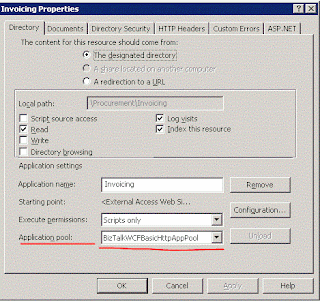
When deploying a wcf service to biztalk the is a good chance you will run into: The Messaging Engine failed to register an adapter "WCF-BasicHttp". Details: "Registering multiple adapter types within the same process is not a supported configuration. For e.g. HTTP and SOAP receive adapters cannot co-exist in the same process" Solution When installting a SOAPm HTTP or WCF service on the same WebServer then seperate app pools must be created for each adapter. Using seperat app pools will solve the issue. Note the this is only a problem om win servers as desktop version of windows does not have an app pool concept.

Unable to Start SendPort

Image
Today I  got an error I havet seen before. When trying to change credentials on a sendport for Oracle I got en error: Unable to enslits due to an unexpected error. Hmm.. Queruying the EventLog helped me a bit further: Hmm how can this bee. I stopped the application and all the hosts. When querying the subscription it was still active. That`s not right! I has to snook around the the  'BizTalkmsgBox' database in the table 'Subscription'. I queried it with : SELECT     nID, dtTimeStamp, nvcName, uidSubID, uidSubGroupID, snGroupPriority, nvcApplicationName, uidClassID, dtStartWindow, dtEndWindow, dtValid,                       uidServiceID, uidInstanceID, uidPortID, uidPredicateGroupID, fEnabled, uidConvoySetID, vtConvoySetProp1DefVal, vtConvoySetProp2DefVal,                       vtConvoySetProp3DefVal, snPartRetrieval, fOrderedDelivery, fIsRequestRespo...

Fully Qualifyed Name

Image
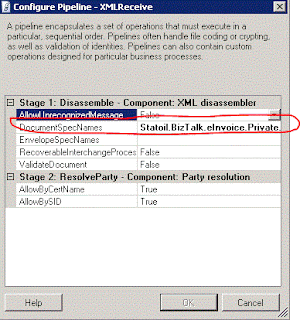
From time to time one need to use the fully qualifyed name for an assembly in Biztalk. This is valid for all versions of BizTalk. The correct syntax in this case is : " +  , " An example for this would be if you need to validate the xml upon the receival, and you need to use the XMLReceive pipeline that ships with BizTalk. You then need to add teh Fully Qualifyed name to The DocumentSpecNames in the configuration shown below. Remember that if you use the RootNode name this is capital sensitive. If you dont do this you will get the famous : No Disassemble stage components can recognize the data. error There was a failure executing the receive pipeline: "Microsoft.BizTalk.DefaultPipelines.XMLReceive, Microsoft.BizTalk.DefaultPipelines, Version=3.0.1.0, Culture=neutral, PublicKeyToken=31bf3856ad364e35" Source: "XML disassembler" Receive Port: " " URI: " " Reason: No Disassemble stage components can recognize the data. 

Error in Services

If you ever see this error message: "Registering multiple adapter types within the same process is not a supported configuration. For e.g. HTTP and SOAP receive adapters cannot co-exist in the same process" it is likely that there is a service with the wrong app pool. WCF-Basic and WCF-Http services must use separate app pools, but can use the same host. Tanx Mark

Configuration Display Error for SQL-Adapter

Image
I just found an issue in the SQL-Adapter for BizTalk 2006R2. It seems that there are different values for displaying the configuration and for the actual configuration. Here is an image showing how it looks like when you open the SendPort to view the details. Don`t trus this view! Here is the actual configuration for the same SendPort with the actual configuration used runtime. If your bindignfile is not 100% acurate you could end up with different values for displaying the configuration and the actual configuration.  As you can see from the images two different values are in the system, but it is the actual configuration that is used. This may happen if you manually update the bindigfile, but forget to update all the entrys for database/queue information.  I have been told that it is the same for MQ-Adapter and even on the BizTalk 2010, but I have not verifyed this

WCF-SQL"Action is not understood"

This is an oldie but goodie. When tryin to deliver data to SQL Server using WCF-SQL on need to be carefull when configuring the sendport. The operation needs to be the same name as used in the orchestration. When adding the action configuration this is how you do it: < BtsActionMapping >              < Operation Name =”THIS NEEDS TO BE THE SAME AS IN THE ORC” Action = “TheAction” \ > < /BtsActionMapping > This is how to do it There is an article at msdn explaining the details here

Could not load file or assembly 'ChilkatDotNet4.dll' or one of its dependencies

When trying to use ChilkatDotNet4 from a BizTalk solution we get the following errror. We are trying to use the 64 bit version. System.IO.FileNotFoundException: Could not load file or assembly 'ChilkatDotNet4.dll' or one of its dependencies. The specified module could not be found. File name: 'ChilkatDotNet4.dll' I am using BizTalk 2010 on Win Server 2008. I found simular problem but not in BizTalk  with solution here.  http://stackoverflow.com/questions/3104988/trouble-registering-chilkatdotnet4-dll-to-the-gac . The solution is however the same: I changed the host from 64 to 32 bit.

Configure II7 on Win 2008 R2

Image
I was trying to use the built in HTTPReceive from BizTalk today, byt the IIS server was not configured to hadle the request. I got an access denied error when calling the BTSHTTPReceive.dll. NOTE: You must be logged on as a member of the BizTalk Server Administrator goup I had to configure the IIS server to be able to utillize this functionality. There is a good explenation on how to do this at microsoft . The way to to it is to add this under Handler Mappings Choose Add Script Map,and set: Request Path = BtsHttpReceive.dll Executable = C:\Program Files\Microsoft BizTalk Server 2010\HttpReceive\BTSHTTPReceive.dll Name = BizTalk HTTP Recevie Under Request Restrictions set under the Verbs tag set POST and under the Access tab set Script Then you haver to Create a new roule under ISAPI and CGI Restrictions: Add an new and set ISAPI or CGI path = C:\Program Files\Microsoft BizTalk Server 2010\HttpReceive\BTSHTTPReceive.dll Description = BizTalk HTTP...

Not able to deploy to BizTalk 2010

When opening an existing BizTalk solution from designed and build for BizTalk 2006 in VS 2010 and deploying to BizTalk 2010 I got an odd error.  The solution builds fine but i cannot get it to deploy..  Error 7 Access to the path 'C:\Users\eriei\AppData\Local\Temp\BT\PID13428\BizTalkAssembly\0b2cb3ce88fbfe1e5d4e7cc6158a6fd1\Statoil.BizTalk.Utility.Archive.ContentManager.ControllerTestApplication.dll' is denied. 0 0 When trying to delete the file from this location the error message chagned to  Error 64 Failed to add resource(s). Change requests failed for some resources. BizTalkAssemblyResourceManager failed to complete end type change request. Assembly "C:\Users\AppData\Local\Temp\BT\PID3724\BizTalkAssembly\63870f24efcb5f96ec704df4b0b0e533\KHS.834Membership.BizTalk.Orchestrations.dll" does not appear to be a BizTalk assembly, and cannot be deployed to the Configuration database. If this assembly is referenced by other BizTalk assemblies, it needs to be...

BAM Portal - Service Unavailable

Image
From time to time I get the 'HTTP Error 503 - The Service is nnavailable' when I try to access my BAM portal Usually I spend a few minutes before I remember how to get past this. It is the account configured to run bam that needs to have its password updated. Most of you should change yor password on a regular basis, and its easy to forget to reconfigure BAM with the new passord. So.. here is the solution: Open Microsoft BizTalk ServerConfiguratiuon tool and update the password for the user running BAM portal Apply configuration, restart ISS to be sure (iisreset) and voia : BAM portal up and runnign again

Illegal 'activate' predecate

Image
I am creating a orch that has filter on the initial receive shape. When building I got these error: Error 1 : identifier 'MySolutionname' does not exist in 'MyOrchName'; are you missing an assembly reference? Error 2: cannot find symbol 'MySolutionname' Error 3: an 'activate' predicate rvalue must be a string, character, boolean or numeric literal Error 4 : illegal 'activate' predicate The solution to this is to put the filter expression in sting literals (i.e. “double quotes”)

MTOM Attachment- i figured it out

Image
I prefer the WebServiceWizard when creating a webSerivce to use with BizTalk. The orchestration is already created so I just choose the orch dll in the wisard. When this is done I add the web service as a existing webService project to the Solution. After some tweeking on namespaces, portnames, SOAPAction, etc. I now have a fully functional WebService that may receive xml files and deliver them to an orchestration. And now the new stuff begins... First of all you have to install wse 3.0. Then you have to add the reference to Microsoft.Web.Service3 to the project. After this I had to restart VS in order to get the new item on the project property --> WSE 3. 0 properties. When this is enabled just rebuild and publish you new WebService, and a section is added in the WSDL describing the mtom attachment.

WebServices and MTOM

I am about to create a webService that receives in attition to xml, binary data. I have to receive this binary using mtom. This is something I havent dont before. According to the posts I have read it should be easy. I just have to enable mtom (WSE 3) in VS. i have no idea on how to do this.. Wi.ll update as son I have som answers

Multipart Messages

This is tricky.. As far as I know this is quite poorly in BizTalk. Considre the scenario: I have an existing solutuion where the core component takes a multipart message. This consists of 3 parts. Now I whant to expand the solution and utillize this core component. This means that the new orchestration needs to submitt a multipartmessage to the core. The core component needs to receive the message with the parts in the same order as its own mulitipart message is defined. Lets say the parts are : EmailBody, EmailOriginalAttacment, and EmailProcessedAttachment. In order to get the two orchestration to talk to eachother the new mulipartmessage parts have to be created in the same order as the original one. It is not enough to call them the same and populate them wiht the correct content. This means that for a 3 part message there are 3! = 6 numbers to define the message. And hopefully you dont do as I and find the correct on the fifth attempt. If you just at one more part you have 4! = 24...