Posts

Fully Qualifyed Name
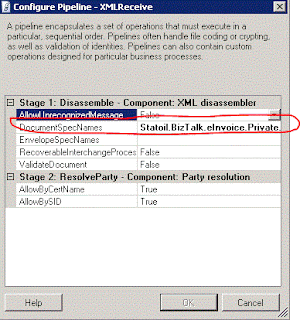
Image
From time to time one need to use the fully qualifyed name for an assembly in Biztalk. This is valid for all versions of BizTalk. The correct syntax in this case is : " +  , " An example for this would be if you need to validate the xml upon the receival, and you need to use the XMLReceive pipeline that ships with BizTalk. You then need to add teh Fully Qualifyed name to The DocumentSpecNames in the configuration shown below. Remember that if you use the RootNode name this is capital sensitive. If you dont do this you will get the famous : No Disassemble stage components can recognize the data. error There was a failure executing the receive pipeline: "Microsoft.BizTalk.DefaultPipelines.XMLReceive, Microsoft.BizTalk.DefaultPipelines, Version=3.0.1.0, Culture=neutral, PublicKeyToken=31bf3856ad364e35" Source: "XML disassembler" Receive Port: " " URI: " " Reason: No Disassemble stage components can recognize the data. 

Error in Services

If you ever see this error message: "Registering multiple adapter types within the same process is not a supported configuration. For e.g. HTTP and SOAP receive adapters cannot co-exist in the same process" it is likely that there is a service with the wrong app pool. WCF-Basic and WCF-Http services must use separate app pools, but can use the same host. Tanx Mark

Configuration Display Error for SQL-Adapter

Image
I just found an issue in the SQL-Adapter for BizTalk 2006R2. It seems that there are different values for displaying the configuration and for the actual configuration. Here is an image showing how it looks like when you open the SendPort to view the details. Don`t trus this view! Here is the actual configuration for the same SendPort with the actual configuration used runtime. If your bindignfile is not 100% acurate you could end up with different values for displaying the configuration and the actual configuration.  As you can see from the images two different values are in the system, but it is the actual configuration that is used. This may happen if you manually update the bindigfile, but forget to update all the entrys for database/queue information.  I have been told that it is the same for MQ-Adapter and even on the BizTalk 2010, but I have not verifyed this

WCF-SQL"Action is not understood"

This is an oldie but goodie. When tryin to deliver data to SQL Server using WCF-SQL on need to be carefull when configuring the sendport. The operation needs to be the same name as used in the orchestration. When adding the action configuration this is how you do it: < BtsActionMapping >              < Operation Name =”THIS NEEDS TO BE THE SAME AS IN THE ORC” Action = “TheAction” \ > < /BtsActionMapping > This is how to do it There is an article at msdn explaining the details here

Could not load file or assembly 'ChilkatDotNet4.dll' or one of its dependencies

When trying to use ChilkatDotNet4 from a BizTalk solution we get the following errror. We are trying to use the 64 bit version. System.IO.FileNotFoundException: Could not load file or assembly 'ChilkatDotNet4.dll' or one of its dependencies. The specified module could not be found. File name: 'ChilkatDotNet4.dll' I am using BizTalk 2010 on Win Server 2008. I found simular problem but not in BizTalk  with solution here.  http://stackoverflow.com/questions/3104988/trouble-registering-chilkatdotnet4-dll-to-the-gac . The solution is however the same: I changed the host from 64 to 32 bit.

Configure II7 on Win 2008 R2

Image
I was trying to use the built in HTTPReceive from BizTalk today, byt the IIS server was not configured to hadle the request. I got an access denied error when calling the BTSHTTPReceive.dll. NOTE: You must be logged on as a member of the BizTalk Server Administrator goup I had to configure the IIS server to be able to utillize this functionality. There is a good explenation on how to do this at microsoft . The way to to it is to add this under Handler Mappings Choose Add Script Map,and set: Request Path = BtsHttpReceive.dll Executable = C:\Program Files\Microsoft BizTalk Server 2010\HttpReceive\BTSHTTPReceive.dll Name = BizTalk HTTP Recevie Under Request Restrictions set under the Verbs tag set POST and under the Access tab set Script Then you haver to Create a new roule under ISAPI and CGI Restrictions: Add an new and set ISAPI or CGI path = C:\Program Files\Microsoft BizTalk Server 2010\HttpReceive\BTSHTTPReceive.dll Description = BizTalk HTTP...

Not able to deploy to BizTalk 2010

When opening an existing BizTalk solution from designed and build for BizTalk 2006 in VS 2010 and deploying to BizTalk 2010 I got an odd error.  The solution builds fine but i cannot get it to deploy..  Error 7 Access to the path 'C:\Users\eriei\AppData\Local\Temp\BT\PID13428\BizTalkAssembly\0b2cb3ce88fbfe1e5d4e7cc6158a6fd1\Statoil.BizTalk.Utility.Archive.ContentManager.ControllerTestApplication.dll' is denied. 0 0 When trying to delete the file from this location the error message chagned to  Error 64 Failed to add resource(s). Change requests failed for some resources. BizTalkAssemblyResourceManager failed to complete end type change request. Assembly "C:\Users\AppData\Local\Temp\BT\PID3724\BizTalkAssembly\63870f24efcb5f96ec704df4b0b0e533\KHS.834Membership.BizTalk.Orchestrations.dll" does not appear to be a BizTalk assembly, and cannot be deployed to the Configuration database. If this assembly is referenced by other BizTalk assemblies, it needs to be...